Buying controls is the easy part. Making a building obey them at 2 a.m., during a vacancy, and on a bright afternoon is where owners either bank real savings or buy expensive hardware that behaves like a manual switch. Smart lighting control systems pay when you treat them as an operating process, with zones, settings, tests, and records, not as a line item added at the end of an LED retrofit.
What Smart Lighting Control Systems Actually Do
A DOE-supported measurement and verification program evaluated advanced or networked lighting controls in small- and medium-sized commercial buildings and reported an average lighting-energy reduction of 29.19%, with monitored projects recording net savings of 515,968 kWh and avoided greenhouse-gas emissions equivalent to 299.45 metric tons of carbon dioxide, according to the U.S. Department of Energy poster on that program. That's the point owners miss. The saving came from controls, on top of fixture efficiency.
Think of a thermostat. It decides when heating runs and how hard it works. Smart lighting control systems do the same job for light, deciding when fixtures run, at what output, and in which zones.
Sensing, Deciding and Acting
Every useful system does three jobs, and a failure in any one of them kills the result.
- Sensing: Occupancy sensors, vacancy sensors, photosensors, timers, and network inputs report whether people are present, how much daylight is available, and what time it is.
- Deciding: Schedules, vacancy timeouts, dimming targets, and daylight thresholds turn those inputs into rules. A conference room might go dark after a short vacancy. A perimeter row might dim only when daylight reaches a set level.
- Acting: Drivers, relays, switches, and gateways switch or dim the fixtures. If a driver doesn't accept the dimming signal cleanly, the rule exists on paper and nowhere else.
An LED fixture uses fewer watts for every hour it runs. Controls cut the hours and the excess light. Say you replace a fixture and cut its wattage, but it still burns in an empty office all night. You've improved efficiency and kept the waste.
A control system isn't a device. It's a set of rules your building follows every hour, including the hours nobody's watching.
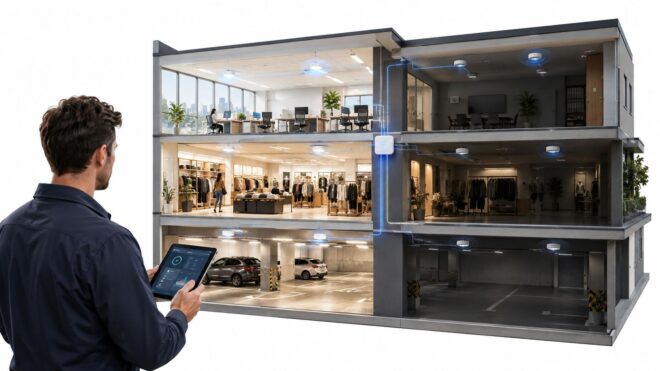
That logic applies across offices, retail properties, parking structures, and multifamily common areas, but the right rules differ sharply by property. Occupancy patterns, daylight, operating hours, and life-safety limits determine which zones can dim, which can switch off, and which must stay on. Get the rules wrong and occupants override them. Get them right and the system disappears into normal operations.
Wired, Wireless and Networked Systems Compared
Wired and wireless describe how devices reach each other. Networked describes whether the system joins a building-level network for monitoring and automation. You can combine them, and in occupied commercial buildings you often should.
By 2017, established wired protocols included 0-10-volt dimming, DALI (Digital Addressable Lighting Interface), and DMX, while wireless systems were increasingly used where rewiring is disruptive, as noted in Architectural Record's continuing education article on lighting controls. Modern fixtures can also carry sensors for occupancy, illuminance, temperature, and energy use, so lighting data can support wider building automation.
| System type | How devices connect | Strengths | Limits | Best fit |
|---|---|---|---|---|
| Wired (0-10 V, DALI, DMX) | Low-voltage control cable run to each driver, switch or sensor | Reliable signal path, predictable response, long service life | Rewiring disrupts occupied spaces and adds labour | New construction, full remodels, gut renovations |
| Wireless (mesh radio such as Zigbee) | Battery or line-powered sensors and switches talk over a radio mesh | Fast installation, no new control cabling, easy to add zones | Interference, security configuration and firmware management | Retrofits, open offices, retail floors, multitenant buildings |
| Networked (BACnet, KNX, DALI-2 or gateway platforms) | Fixtures or gateways join a building network that carries data and commands | Central monitoring, scheduling, reporting and HVAC or BMS integration | Higher design effort and a qualified integrator needed | Portfolios that need reporting, demand response or building automation |
| Hybrid (wired backbone with wireless sensors) | Wired control for fixtures, wireless devices for sensors or switches | Balances disruption and reliability | Two systems to commission and document | Existing buildings with partial access or mixed tenants |
Check Lock-In Before You Check Price
Before you choose, confirm that sensors, gateways, and fixtures support open protocols, that you can export occupancy and energy data, that remote access is secured, and that replacement parts don't depend on one vendor. Ask what still works if cloud service ends and whether manual fallback control remains available. A closed platform can strand the whole investment when a product line changes.
I would start with the smallest layer that meets your code and savings targets. Compare rewiring cost and tenant disruption against the actual value of reporting and HVAC integration. You can add monitoring or demand response later if the base architecture is open.
Where the Energy Savings Come From
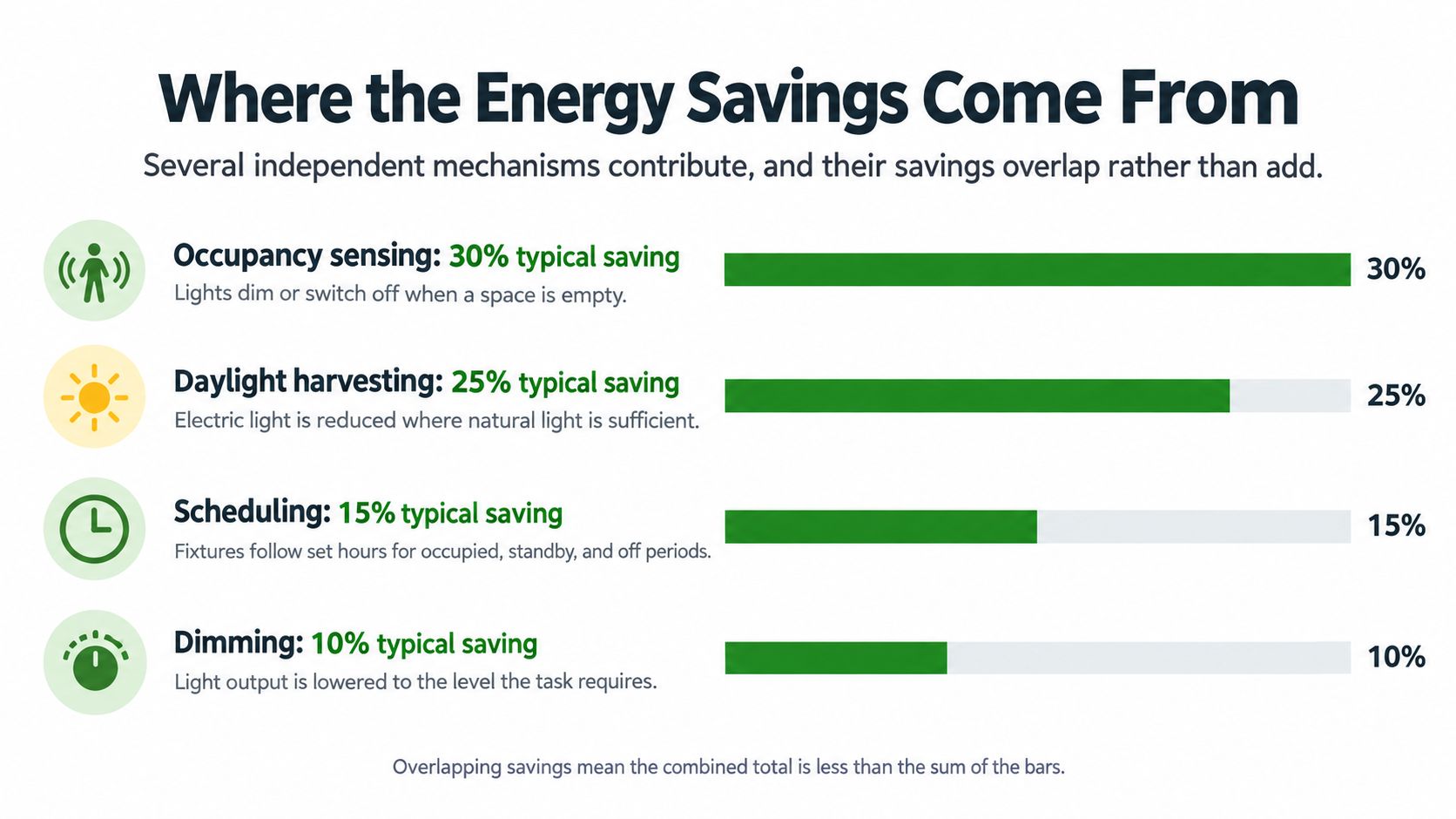
Savings don't come from one clever device. They come from several independent mechanisms, and those mechanisms overlap rather than add. The U.S. Energy Information Administration reports approximately 24% lighting-energy savings from occupancy controls, while institutional tuning can achieve about 36%, and DOE estimates typical savings of 5-10% from dimming and 9-15% from daylight-responsive photosensors across building types, according to the EIA study of commercial building sensors and controls.
| Strategy | What it changes | Typical saving | Source |
|---|---|---|---|
| Institutional tuning | Corrects schedules, setpoints and minimum light levels | About 36% | EIA |
| Occupancy sensing | Turns lights down or off in vacant zones | About 24% | EIA |
| Daylight-responsive photosensors | Reduces electric light when daylight is available | 9-15% | DOE estimate |
| Dimming | Lowers fixture output when full light is not needed | 5-10% | DOE estimate |
Why the Percentages Do Not Add Up
Institutional tuning sits at the top because it fixes the system itself. You're correcting schedules that run too long, setpoints that are too high, and minimum levels nobody needs. Occupancy sensing cuts operating hours in vacant zones. Photosensors reduce electric light near windows and skylights, and dimming trims output when full brightness isn't required for the task.
Say an office uses all four ideas. A sensor shuts off a vacant conference room, a photosensor dims the perimeter row by the windows, and a schedule turns off the corridor at night. The second and third strategies act on a load the first strategy has already reduced, so the combined saving is smaller than the sum of the individual percentages. Any proposal that adds them is inflating the case.
Sequence matters too. Establish zone-level schedules, calibrate vacancy timeouts and sensor coverage, commission minimum dimming levels, then verify against submeters or trend logs. Compare equivalent occupancy and weather, and separate lighting energy from whole-building energy.
Don't apply one percentage to offices, retail, parking structures, and multifamily common areas alike. These figures are benchmarks for screening a project. Your measured baseline, operating hours, and zone behavior set the actual projection.
Title 24 Requirements Your Controls Must Meet
California's 2022 Title 24, Part 6 sets performance requirements for controls in covered spaces. For covered office areas, occupant-sensing controls must reduce lighting power by at least 80% within 20 minutes after vacancy, and all lighting in the overall office area must switch off within 20 minutes when zones are unoccupied. Qualifying nonresidential general-lighting systems of 4,000 W or more must also accept a demand-response signal and reduce installed full lighting power by at least 15%, as summarized in Buildings magazine's guide to Title 24 lighting controls.
| Requirement | Threshold | What to document |
|---|---|---|
| Occupancy control in covered office areas | Lighting power cut by at least 80% within 20 minutes of vacancy | Sensor zone map, vacancy timeout settings, functional test result |
| Whole office area shutoff | All lighting switched off within 20 minutes when zones are unoccupied | Time-to-off test results per zone |
| Demand-responsive control | Applies to nonresidential general-lighting systems of 4,000 W or more; must reduce installed full lighting power by at least 15% on signal | Signal path, achieved reduction, response time |
| Emergency lighting | Egress and life-safety lighting stays on where the code requires it; state which exception applies | Exception basis and functional test record |
Design Consequences You Cannot Delegate to the Product Box
The requirements start with zone design, not equipment selection. Sensors need to detect actual occupancy. A sensor covering both a private office and part of an open plan can cause false-on operation, false-off complaints, or both. Partitions, tall shelving, and glass fronts affect coverage, so coordinate the reflected ceiling plan with the furniture plan.
Demand response also depends on the whole control path. Panels and network gateways must carry the signal reliably to the fixtures, and commissioning must record the response time and achieved power reduction. If a gateway loses its programming after an outage, the system may no longer respond as required.
Set the requirements before installation. Construction documents should specify sensor coverage, vacancy behavior, manual override limits, dimming compatibility, emergency-lighting exceptions, and functional-test procedures. Use the Title 24 lighting requirements guide to review how the code applies to the project before equipment is released.
Practical rule: A submittal can show that components are compatible. Only functional testing demonstrates that automatic shutoff and demand response work.
Build the commissioning file as the system goes in. Keep the zone map, timeout settings, dimming floors, exception basis, and signed functional tests together. That record lets an inspector or facility manager trace how each zone is intended to operate, and helps prevent a control setting from being lost between installation and ongoing operation.
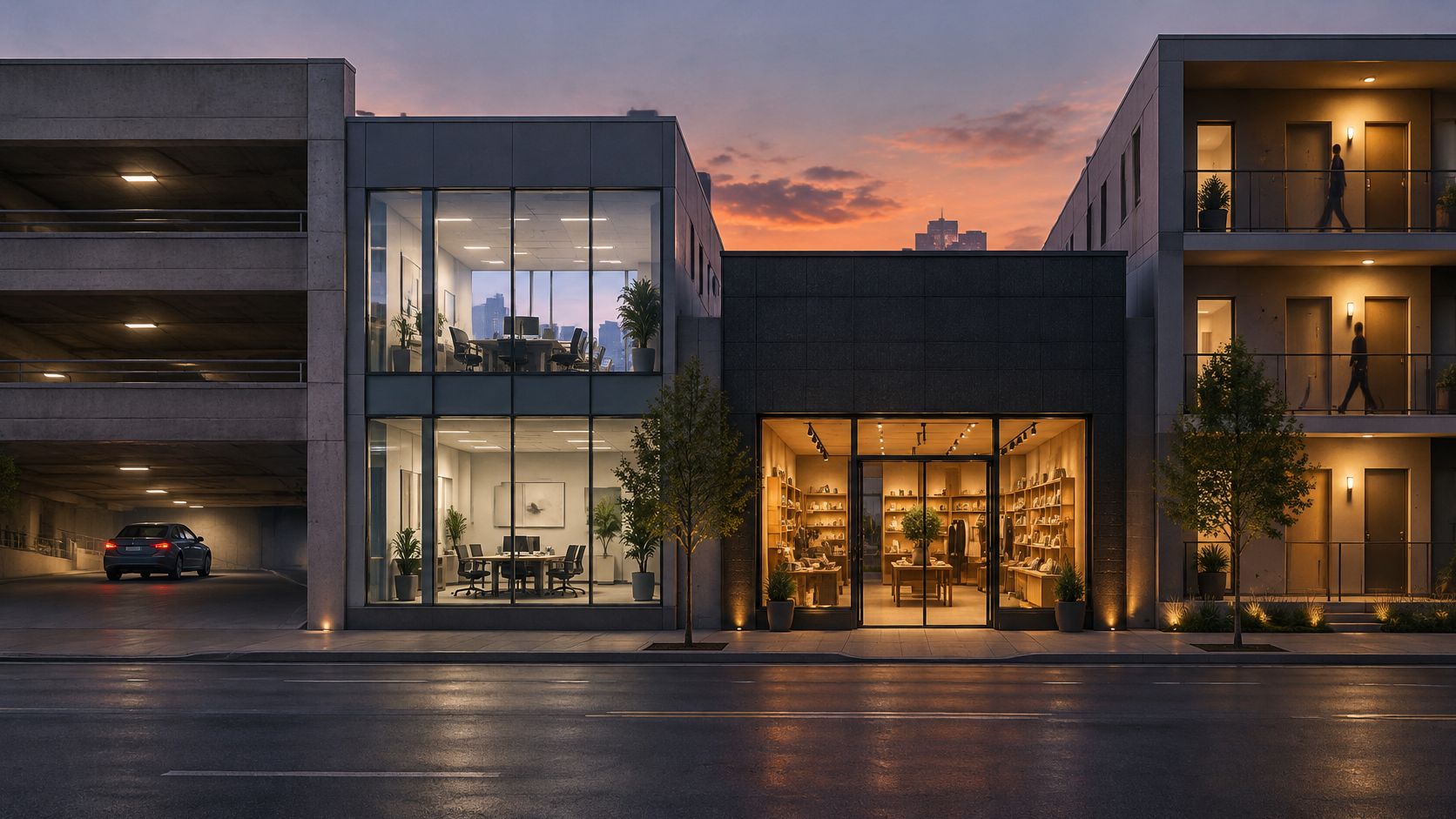
How Parking, Offices, Retail and Multifamily Differ
Four buildings can buy similar fixtures and need four different control strategies. The schedule is the difference. Before design starts, answer one question for every zone: which lights run the most hours, and what can safely dim or switch off?
Parking Structures Run Long and Empty
A parking structure has long operating hours with bursts of movement. Occupancy sensing can drop fixtures to a standby level between vehicles, then raise output as a car or pedestrian enters the zone. Dusk-to-dawn schedules and networked monitoring handle exterior areas and fault reporting.
The watch-out is geometry. Sensor range along long drive aisles, mounting height, ramps, and parked vehicles can create dead spots. Design the zones around travel paths, stairs, elevators, and payment areas, and check the layout against parking lot lighting standards so standby levels still support safe movement.
Offices Fail on Overrides
An office runs on predictable business hours, so vacancy timeouts, schedules, and daylight harvesting near windows do most of the work. Private offices and conference rooms need tighter zones than open plans. Put a sensor where it sees a corridor through glass and it'll keep an empty room lit. Put it where a seated occupant sits still outside its view and you'll train people to wave at the ceiling.
Overrides are the other failure point. Give occupants sensible local control, but make overrides expire and return the zone to its schedule. A permanent override quietly converts an automatic system back into manual lighting.
Retail Protects the Sales Floor
A retail store works to fixed trading hours but changes displays often. Zone-based scenes and schedules matter because the entrance, sales floor, stockroom, and fitting rooms don't need the same light at the same time. Daylight harvesting can help near storefront glazing. It shouldn't make merchandise look flat at noon.
Test dimming with the actual fixtures and finishes in place. A setting that looks acceptable in an empty white-box space can look wrong once shelving, signage, and dark displays go in.
Multifamily Common Areas Need Restraint
Corridors, stairs, laundry rooms, leasing areas, and garages offer long hours and intermittent use, so occupancy sensing and scheduling can deliver strong value. Life-safety lighting must stay on where required, and egress paths need conservative settings. Confirm which code path applies and meter common-area loads separately from residential units, otherwise you won't be able to prove what the controls saved.
How to Plan and Commission a Control System
Commissioning isn't a final walk-through with a laptop. It's the sequence that turns installed parts into measured performance. Skip a phase and the gap usually shows up later as nuisance switching, failed tests, or savings nobody can verify.
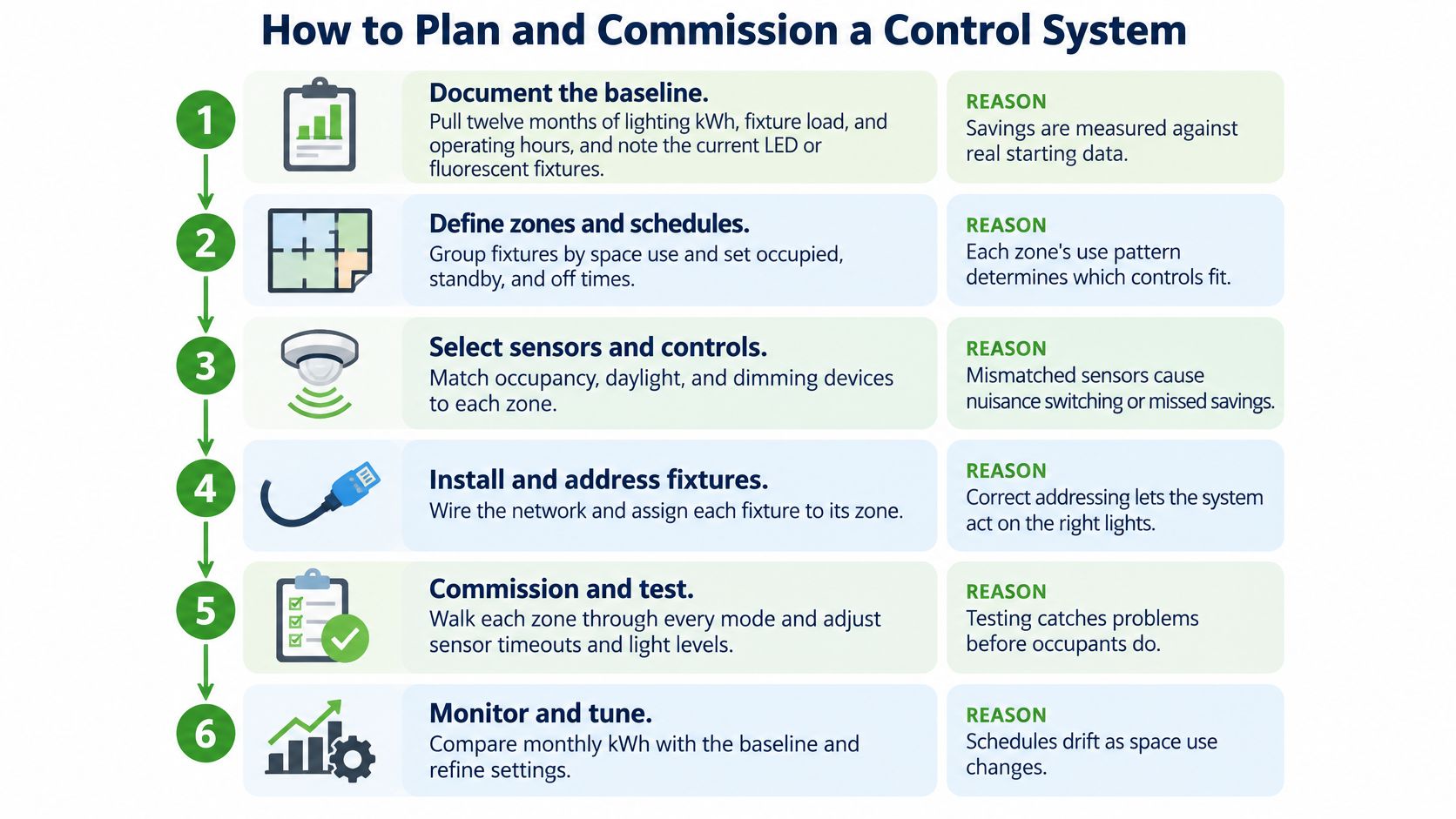
Document the baseline: Pull twelve months of lighting kWh where available, or record fixture load and operating hours zone by zone. Note current LED wattage so fixture savings and control savings stay separate. The common slip is using whole-building utility data and calling every later change a controls saving.
Map zones: Group fixtures by occupancy pattern, daylight exposure, and code requirement. A window row, an interior office, and an egress corridor shouldn't share one rule just because they're on one circuit. The common slip is zoning by electrical convenience instead of how people use the space.
Choose the architecture: Use wired control where ceilings and walls are open, wireless where occupied-space disruption controls the decision, and networked control where reporting, demand response, or building-system integration is required. The common slip is buying a platform for dashboards nobody will open after handover.
Write the specification: State Title 24 thresholds, sensor coverage, vacancy timeouts, override limits, dimming compatibility, daylight thresholds, and emergency-lighting exceptions. Require a zone map and sequence of operations for every space type. The common slip is specifying a brand and assuming the sequence will sort itself out in the field.
Check the vendor: Confirm support for open protocols such as BACnet, KNX, or DALI-2, who owns occupancy data, how remote access is secured, and who handles firmware. Require fallback manual control, owner-held credentials, network diagrams, and replacement sensors or gateways available from more than one source. The common slip is accepting an app login while the integrator keeps the only administrator account.
Commission: Set vacancy timeouts, minimum dimming floors, daylight thresholds, and schedules, then walk every zone through occupied, vacant, daylight, override, and demand-response modes. Record response times and achieved power reduction. The common slips are a sensor hidden behind a shelf and a daylight sensor reading a skylight from the wrong side.
Verify and retune: Meter representative zones or use trend logs, compare results with the baseline under similar weather and occupancy, and retune seasonally as daylight and schedules shift. Audit overrides and failed sensors. The common slip is treating handover settings as permanent when tenants, layouts, and hours change.
Don't accept a system because the lights turned on during the walk-through. Accept it when each zone passes its sequence, the records match the field settings, and the owner holds the credentials.
Why Projected Savings and Payback Often Disappoint
Headline savings figures usually hide the baseline. Lawrence Berkeley National Laboratory research summarized by the U.S. Department of Energy found that controls saved 8-23% compared with an LED-only baseline in evaluated projects, while a separate review of 240 savings estimates from 88 sources reported average savings of 24% for occupancy controls, 28% for daylighting, 31% for personal tuning, 36% for institutional tuning, and 38% for combined strategies, according to the DOE Integrated Lighting Campaign resources. Those numbers aren't contradictory. They're measuring against different starting points and different operating conditions.
Run the Payback Arithmetic Yourself
Use a simple formula first: annual kWh saved multiplied by your electricity rate, minus added annual maintenance, divided into installed control cost. Then test whether the result survives a lower savings assumption.
Say a parking lot has 120 LED fixtures at 100 W running 4,000 hours a year. That's a 48,000 kWh baseline. These are illustrative assumptions, not a quote or a rate forecast.
| Assumed reduction | Annual kWh saved | Annual savings at $0.30 per kWh | Simple payback on $24,000 |
|---|---|---|---|
| 10% | 4,800 kWh | $1,440 | 16.7 years |
| 20% | 9,600 kWh | $2,880 | 8.3 years |
| 30% | 14,400 kWh | $4,320 | 5.6 years |
That spread is the key decision. At a low reduction, occupancy controls on already efficient LEDs may take a long time to pay back on energy alone. Code compliance, maintenance visibility, demand response, or avoided rewiring may still justify the project, but don't let a vendor bury those reasons inside an aggressive energy claim. For zone selection, the practical guidance on occupancy sensor lighting helps separate high-hour opportunities from marginal ones.
Most disappointments trace back to commissioning, zoning, occupant behavior, or no tuning after handover. Sensors face the wrong way, timeouts stay at factory defaults, daylight sensors aren't calibrated, and overrides become permanent. None of those problems appears in a product brochure.
I would compare total cost over 10-15 years, not first cost alone. Include licensing, gateway and sensor replacement, battery changes where applicable, integrator support, firmware work, and periodic retuning. Require a measurement plan before installation: document the baseline, meter representative zones, audit schedules and overrides, verify emergency-lighting behavior, and retune seasonally. If a proposal can't explain how savings will be separated from the LED retrofit and checked with interval data, treat its payback as an estimate with wide error bars.
Plan Your Controls Upgrade Before You Buy
Start with the building's existing equipment and operating pattern. Where conventional fixtures remain, complete the LED retrofit first, then add occupancy controls in the zones with the longest operating hours. This establishes the new lighting load before controls are evaluated and directs spending to areas where runtime can support the investment.
For occupied buildings, wireless or hybrid controls can reduce ceiling work and simplify phasing. Check for interference, confirm secure remote access, and ensure the owner retains system credentials. Portfolio operators who need reporting, demand response, or HVAC integration should specify a networked system using open protocols. The trade-off is clear: simpler retrofits can limit installation disruption, while broader integration requires careful coordination and control of system access.
Before selecting equipment, request a site assessment with a twelve-month baseline and zone map. Require the open-protocol list, commissioning and Title 24 documentation plan, and post-installation verification schedule. These documents define how the system will be set up, checked, and maintained after handover.
Access Electrical and Lighting serves Orange County and Southern California with commercial lighting controls, LED retrofits, and Title 24 testing and documentation. Request an assessment before committing to hardware, and base the package on measured operating hours and code requirements. Access Electrical and Lighting offers these services for commercial properties.